
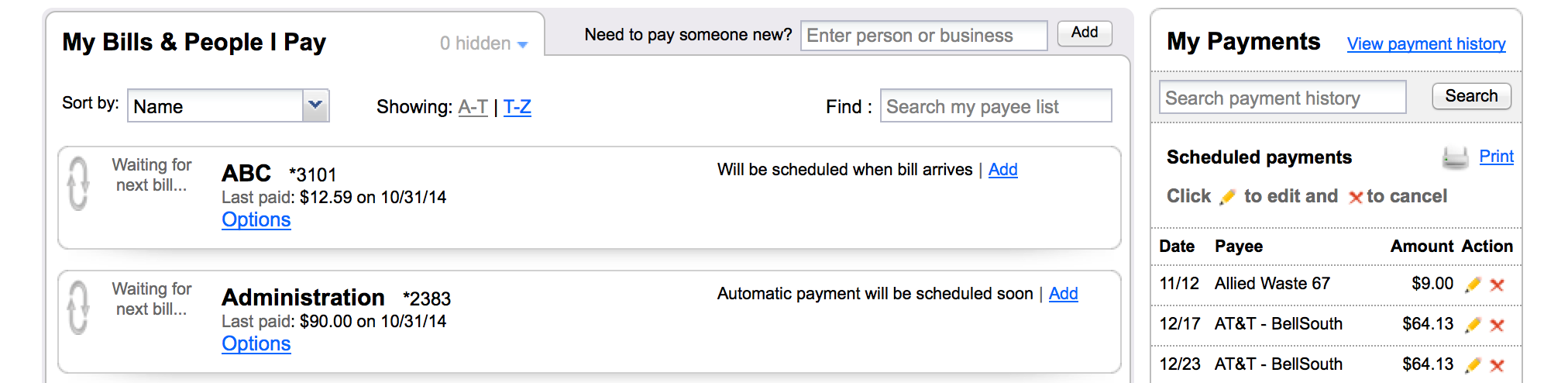
To view payments that have been made review the list of “Scheduled payments”, “In-process payments”, or “Recently processed payments” on the right hand side of the “My Bills & People I Pay” page. You can click on the “View payment history” link to view additional detail.
By Phone
Call Deluxe directly at 877.838.5287.
Call a AdelFi Member Service Representative at 800.347.AdelFi (2228).
By Mail
Send in your reorder slip to AdelFi, 255 N Lone Hill Ave., San Dimas, CA 91773
While each organization is different, general best practices include:
- An announcement email to your staff
- Printing PDF fliers to put into breakrooms and/or staff mailboxes
- A posting on your intranet where staff benefits and announcements are highlights
- Fliers in packets for new hires
If you have already enrolled with Zelle®, you do not need to take any further action. The money will be sent directly into your bank account and will be available typically within minutes.
If you have not yet enrolled with Zelle®, follow these steps:
- Click on the link provided in the payment notification you received via email or text message.
- Select AdelFi Christian Banking.
- Follow the instructions provided on the page to enroll and receive your payment. Pay attention to the email address or U.S. mobile number where you received the payment notification – you should enroll with Zelle® using that email address or U.S. mobile number where you received the notification to ensure you receive your money.
Download the app from the store, have your card available, and register from the phone. You will verify your identity, select security questions, and create a Mobile Credit Card App user ID and password.
For Ministry and Business Accounts using Premier Cash Management, you will need to log in using the myAdelFi – Business mobile app. The first time using the app for deposits, you will need to select the “Deposit” option at the bottom of the screen. You’ll be prompted to accept our “Terms & Conditions.” Once reviewed and approved by AdelFi team, you can begin making mobile deposits for your church, ministry, or business.
Learn more▸
Contact us to enroll your organization in online banking. Once enrolled, you can add additional users as needed.
By Phone
Call Deluxe Direct at 800.328.7205.
By Mail
Send in your reorder coupon to AdelFi, 255 N Lone Hill Ave., San Dimas, CA 91773
Online
Click here to order online with ShopDeluxe® Business Checks
Email your deposit ticket order request to reorder@cccu.com. Please include:
Ministry Name
Address
City, State, Zip
Contact Person
Phone Number
Email
Quantities of 150 will be ordered at a time. Deposit tickets may not be ordered through an outside vendor.
Please find the contact information below to report your Ministry/Business AdelFi Debit or Credit Card lost or stolen:
Debit Card
Domestic – 800.634.3228
International – 909.941.1398
Credit Card
Domestic – 800.VISA.911
International – 727.570.4849
We understand that sometimes it may be necessary to delete your online banking profile.
If you wish to proceed with this request, please login to Online Banking or the AdelFi Mobile app and contact us through Secure Support Email or Secure Chat.
IMPORTANT NOTE: Upon deletion of your profile, you will lose access to the following online services:
- Bill Pay
- Zelle
- External Funds Transfer
- Scheduled Recurring Transfers
- Card Alerts & Controls
- Secure Support Email
- Secure Chat
If you have any recurring payments or transfers set up, please make sure to cancel them before requesting profile deletion to avoid any disruptions or issues.
For further assistance or questions regarding the deletion of your online banking profile, please don’t hesitate to contact us through any of the methods listed above.
To manually request a wire transfer, mail a request on ministry letterhead with two authorized signatures to AdelFi. Please include the following information:
Beneficiary bank name
Receiving bank ABA number
Beneficiary name
Beneficiary account number
Beneficiary address
Wire amount
Wire fee acknowledgement
Contact person name and phone number
Ministry account number
Authorized signatures
You can also initiate wires online. Call The Ministry Development Group at 800.347.AdelFi (2228) ext. 6216 or email us to sign up for this service.